
Analytics
The Analytics page gives you a workspace-level view of activity and revenue over time. It lives at its own top-level Analytics tab, not inside Settings.
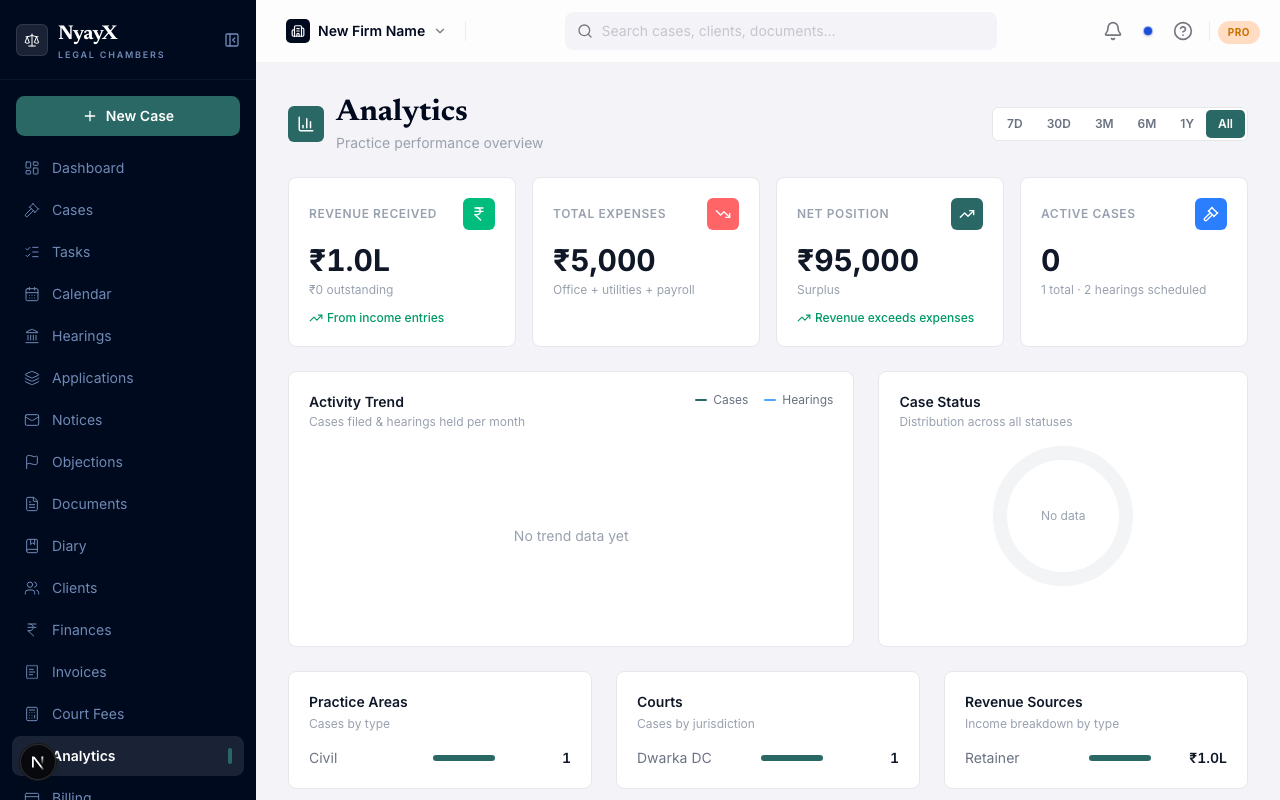
Analytics - revenue, activity and hearing charts
What Analytics shows
| Section | What it covers |
|---|---|
| KPI row | Revenue received, total expenses, net position, and open cases |
| Usage summary | All-time totals for documents, hearings, tasks and average active users |
| Activity trend | A line chart of cases filed and hearings held, by month |
| Case status | A donut chart of case status distribution |
| Breakdown row | Practice areas, courts by jurisdiction, and revenue sources - side by side |
| Hearing summary | Hearing counts and outcomes |
| Deadline compliance | How consistently deadlines are being met |
Time range
Use the period selector to choose 3, 6, 12 or 24 months of history - 6 months is the default. There’s no 7-day view and no custom date range.
Exporting data
Two CSV exports are available: a full usage-history report (server-side) and a page-summary export of the finance and case figures currently shown on screen.
Who can see it
Analytics is gated by the same tab-permission system as everything else - owners always see it. Other members need the Analytics tab set to at least View (see Tab permissions). There’s no separate per-member breakdown view; Analytics reports at the workspace level only.