
Case list & filters
The Cases page is your central case registry. It shows every case in your workspace with status, priority, court, and next hearing date, and lets you narrow the list down to exactly what you need.
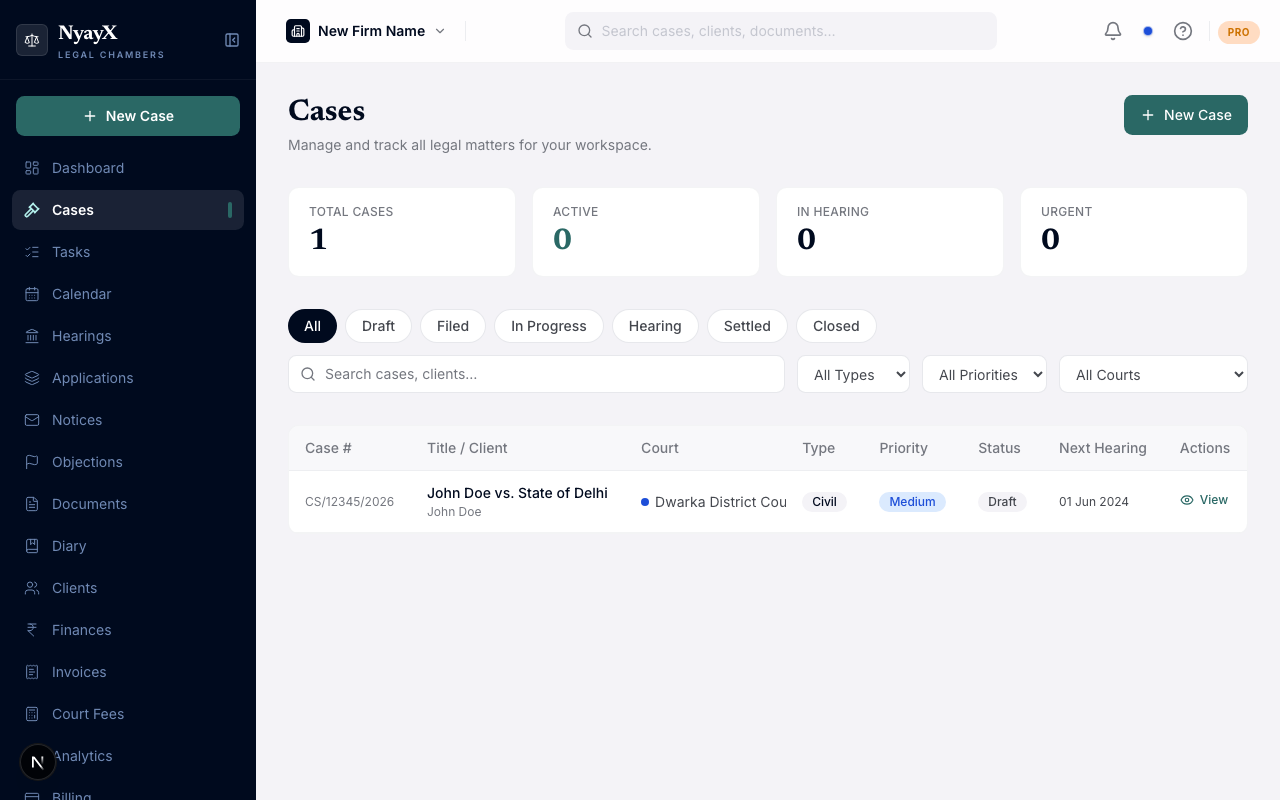
The Cases list: each row shows case number, title, client, court, type, priority, status, and next hearing date
Stats tiles
Above the list, four tiles summarize your caseload:
- Total Cases: every case in the workspace
- Active: cases with status Active (filed)
- In Hearing: cases currently at the Hearing stage
- Urgent: cases marked Urgent priority
Searching cases
Type in the Search cases, clients… box to filter by case number, case title, or client name. Results update as you type.
Filtering by status
Status pill tabs sit above the search row:
- All
- Draft: created but not yet filed
- Active: filed and ongoing
- Settled
- Closed
The page opens on Active by default. Whichever tab you last used is remembered on your device the next time you open Cases.
Filtering by case type, priority, and court
Three dropdowns sit next to the search box:
- Type: All Types, Civil, Criminal, Corporate, Family, Property, Other
- Priority: All Priorities, Low, Medium, High, Urgent
- Court: appears once your workspace has at least one court in use. It lists every court name used anywhere in the workspace, including any that aren’t on the current page, each with its court-color dot. This is useful when you practice across multiple courts and want to focus on one at a time.
Filtering by assignee
- Assigned to me: a toggle that filters the list down to cases assigned to you.
- Workspace owners and admins also get a dropdown to filter by any teammate’s assignment, since they can see and assign across the whole team. Other roles only see the “Assigned to me” toggle.
Sorting
There’s no clickable column sort in the current list. Cases load newest-created-first; use search and the filters above to find what you need.
Selecting and archiving cases
On desktop, each row has a checkbox. Select one or more cases and a floating action bar appears at the bottom of the screen:
- Archive: after a confirmation dialog (“Archived cases are hidden from the active view but remain recoverable”), moves every selected case to Archived status
- Clear selection
Pagination
The list loads 20 cases per page. Use Previous / Next at the bottom to move through pages. The footer shows “Showing X to Y of N cases”.
Opening a case
Click any row (or View on mobile) to open that case’s detail page. See Case detail tabs.