
Overview
NyayX is a legal practice management platform built for Indian lawyers and law firms. It centralizes cases, hearings, tasks, documents, finances, and client records in one workspace, with direct integrations into the Supreme Court, Delhi High Court, District Court, tribunal, and consumer forum portals.
You sign in with a WhatsApp OTP (see First login & workspace setup), work inside a workspace shared with your team, and your daily starting point is Home.
The dashboard at a glance
When you log in you land on Home (/home), which shows:
- Welcome banner: a greeting with your name, today’s hearing count, and urgent deadline count
- Stats tiles: active cases, today’s hearings, pending tasks, urgent deadlines
- Activation checklist: appears until you finish the required setup steps (first case, billing details, and so on); dismiss it once you’re up and running
- Today’s schedule: hearings and tasks due today, color-coded by court
- Active cases: breakdown of your caseload by type (Civil, Criminal, Corporate, Family, Property, Other)
- Upcoming hearings: the next several hearing dates across all courts
- Quick actions: one-tap links to create a case, add a hearing, or log a task
- Urgent deadlines: tasks and deadlines flagged as due soon or overdue
- Recent activity: the latest changes made in your workspace
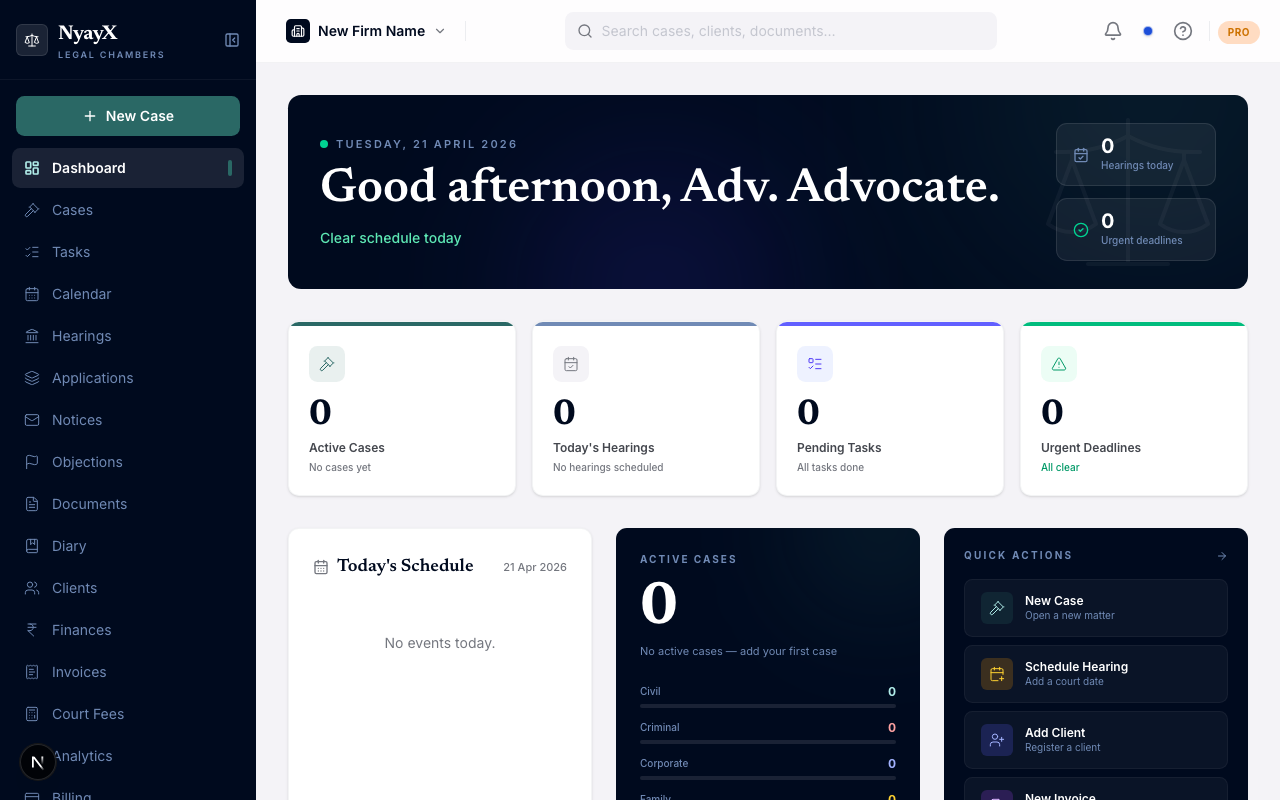
Home, your daily starting point
Today’s Board: the daily court view
Separate from Home, Today’s Board (/board) lists every matter you have listed today across the Supreme Court, Delhi High Court, District Court, tribunals, and consumer forums, grouped by court number the way a physical cause list would be. From there you can download a single combined PDF of your day, or split it into one PDF per court. See Today’s Board.
Two related views sit alongside it:
- Court Mode: a live, in-court companion view. Toggle it on from the button in the top bar on any page; it tracks your position (NDOH), lets you record passovers, and stays focused on what’s happening right now. See Court Mode.
- Pending Dates: cases where NyayX doesn’t yet have a confirmed next hearing date, surfaced inside the Hearings page so nothing falls through the cracks. See Pending Dates.
Sidebar navigation
The left sidebar is organized into collapsible groups. What you see depends on your role and your workspace’s plan: owners see everything, while other members see only what their role and tab permissions allow.
| Section | What’s here |
|---|---|
| (top, ungrouped) | Dashboard, Today’s Board, Clients, Team |
| Case Management | Cases, Tasks, Deadlines, Hearings, Documents, Notices |
| Schedule | Calendar, Cause Lists |
| Billing | Invoices, Expenses, Court Fees, and GST & TDS (once enabled) |
| Account | Profile, Subscription |
| Resources | Law Library |
| Insights | Analytics |
| (bottom, ungrouped) | Support, Settings |
A group only appears if it has at least one item you’re allowed to see, and each group remembers whether you last collapsed or expanded it.
Next steps
Continue with First login & workspace setup if you haven’t logged in yet, or jump to Add your first case if your workspace is already configured.